F-Droid 2.0 lands as its biggest update in a decade
The free software Android store has a new Discover screen, search that reads app descriptions and a unified installer built on Android's pre-approval API.
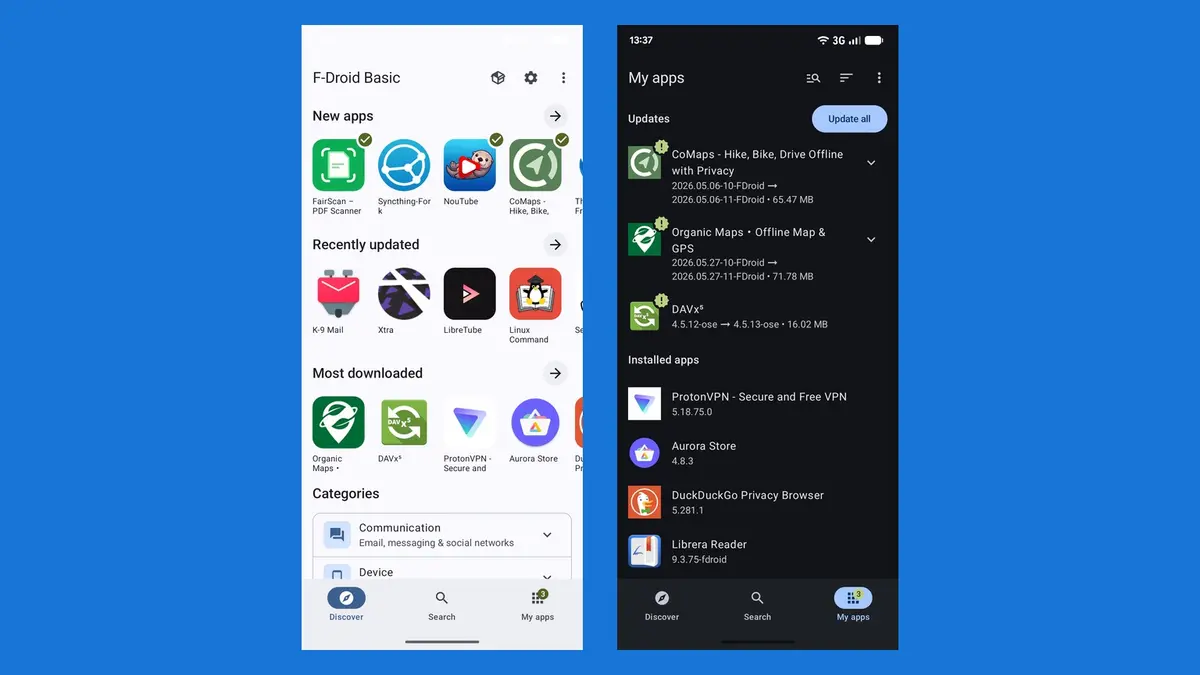
After more than a year of work and fourteen test releases, F-Droid has shipped version 2.0. The project calls it the largest update to its Android app in ten years, and it is now rolling out to users over the coming weeks. The rebuild is more than a coat of paint: the client has been rewritten in Kotlin using Jetpack Compose, which is the toolkit modern Android apps are built with, and it now follows Material Design closely enough to stop feeling like a different operating system.
What is actually going on
Navigation has been cut back to three places: Discover, Search and My Apps. Settings and Nearby Swap are still one tap away in the top bar rather than competing for space. Discover now pushes newly added apps, recently updated apps and the repository's most downloaded apps, and the category system has been expanded with higher-level meta categories so browsing does not begin with a wall of tags. The Games category has been split into seventeen genres, which is the sort of change that only matters once you have tried to find a puzzle game in a list of everything.
Search is the part that will change how the store feels day to day. It no longer just matches names: it reads app descriptions, categories and translated content, so you can look for what an app does rather than what it is called. Support for Chinese, Japanese and Korean has been substantially improved, and the app remembers recent queries. Filters can be combined across category, device compatibility and anti-features, so you can ask for action games that run on your device and avoid anything depending on non-free network services. Onboarding screens explain the capabilities as you meet them instead of burying them in settings.
Installs finally stop being second class
The other headline change is the installer. Android now offers app stores a smoother, more automatic install and update path, and F-Droid attributes that opening to the European Union's Digital Markets Act and antitrust action elsewhere. F-Droid 2.0 uses a unified installer for every install, whether the store came with the operating system or you sideloaded it, and it makes use of the new pre-approval API: on supported devices you confirm the install right after deciding to do it, rather than after the download has finished. That is the difference between a prompt and an interruption. The overhaul also means the separate Privileged Extension is no longer used, because the Android session installer can now handle background updates on recent versions on its own.
What has moved, and what has gone
Update checks now happen automatically in the background, and F-Droid's justification for the change is refreshingly blunt: the best refresh button is the one you never have to press. Pull-to-refresh no longer checks for updates, the gesture is only for scrolling, and the manual check has moved to the overflow menu on the My Apps screen. Data-usage settings have been reworked for people on expensive mobile data or preferring restricted network traffic. Tor auto-detection has been removed after years of platform churn, with existing settings migrated to generic proxy settings and Tor VPN recommended instead. The panic features that scrub sensitive information from a device remain, but the app-hiding disguise no longer pretends to be a calculator: it now changes only the icon and the name, which tells users honestly that F-Droid will still appear in Android's own app list. One feature has not come back at all. Wiping apps in response to a panic trigger needs specialised maintenance for a small number of users, and F-Droid has asked anyone who depends on it to hold off updating while it decides what to do.
Our opinion
F-Droid has spent a decade being excellent at the hard part and poor at the easy part, and this release fixes the easy part. Installing an app from F-Droid has always felt like a negotiation with Android, and the pre-approval work turns that into something close to what the built-in store does. That matters more than the redesign, because the EU rules and Google's own verification plans are about to decide whether alternative stores remain practical, and a store that cannot install software smoothly loses that argument no matter how free its licence list is. The honesty around the panic features is worth crediting too: telling users to delay updating rather than quietly dropping a safety feature is the kind of communication most projects avoid. We would still like the calculator disguise back, or something closer to it, because the people who used it were not doing it for fun, and a masked icon is a thinner protection than the project once offered.