TinyDesk gives an ESP32 a mouse-driven desktop in a terminal
An MIT-licensed project draws draggable, resizable windows in ANSI text over a serial link, so a microcontroller can hand you a shell, editor and file manager.
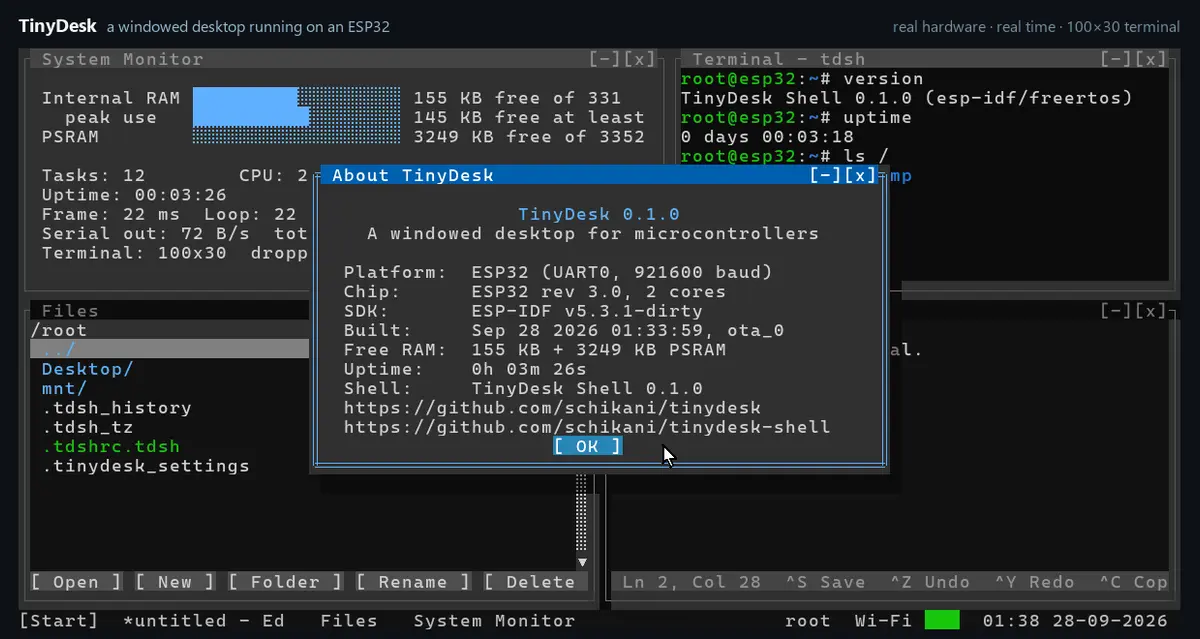
A microcontroller can now run a desktop, as long as you accept that a desktop can be made of text. TinyDesk, released as a v0.1.2 developer preview under the MIT licence, draws overlapping, draggable text-mode windows with ANSI escape sequences and reads the keyboard and mouse back from whatever terminal is attached to the board.
How a terminal becomes a desktop
There is no display hardware involved. Open a UTF-8 terminal with ANSI/VT cursor control and xterm mouse reporting — a configured PuTTY window will do — on the board's serial port, and TinyDesk paints a taskbar, start menu and z-ordered windows that can be dragged, resized, minimised and maximised. Screen size follows the terminal, and copy and paste works between the desktop and the PC.
The core is portable C11 with no third-party dependencies. Screen buffers are allocated at initialisation, and only the cells that changed are sent each frame, which is what makes the whole trick workable over a serial link.
What it runs on
The supported boards are the ESP32-C6 over its built-in USB port and the classic ESP32 over USB-UART at 921600 baud, with PSRAM required for the 16MB build; the 4MB board tops out at an 80x25 screen without SSH or over-the-air updates. The same code runs natively on Linux, Windows and macOS for development, and the project says a new target needs only four functions.
Inside the desktop there is a Terminal running TinyDesk Shell — a Unix-like shell with users, files, .tdsh scripts, Wi-Fi and Ethernet support — alongside Files, Editor, Network, MQTT, Modbus over TCP and RTU, Task Manager, System Monitor, Log Viewer, Settings and a Software Update app for over-the-air flashing. A small API exists for writing your own.
Installing it, and the caveats
TinyDesk can be flashed from a browser in Chrome or Edge without a toolchain, and the project also ships Windows and Linux programs. Each release bundles firmware images for both editions, the PC builds and a SHA256SUMS.txt file, with the web installer using the same files.
Two limits are worth knowing before you flash a board: the root-only desktop takeover runs over unencrypted Telnet, and SSH provides an encrypted shell and SFTP but not the windowed desktop. Wi-Fi, FTP, SMB mounts and W6100 Ethernet are reached from the shell rather than from a settings pane.
Our opinion
TinyDesk looks like a joke until you read the constraints it is actually solving. The interesting decision is not that it draws windows, but that it sends only changed cells every frame and keeps the core at C11 with zero dependencies: that is what lets an 8MB board feel responsive at 921600 baud instead of like a slideshow. Whether anyone wants a desktop on a microcontroller is a fair question, and the answer implied by the file manager, the scriptable shell and the OTA updater is that people building IoT hardware would rather have a familiar window manager than another web dashboard. It is a developer preview, and it reads like one.