Amazon CloudWatch Omni turns observability into an AI agent
Amazon Web Services has made CloudWatch Omni generally available, an AI-first observability experience that maps services, agents and dependencies in one place and answers questions about them in plain English.
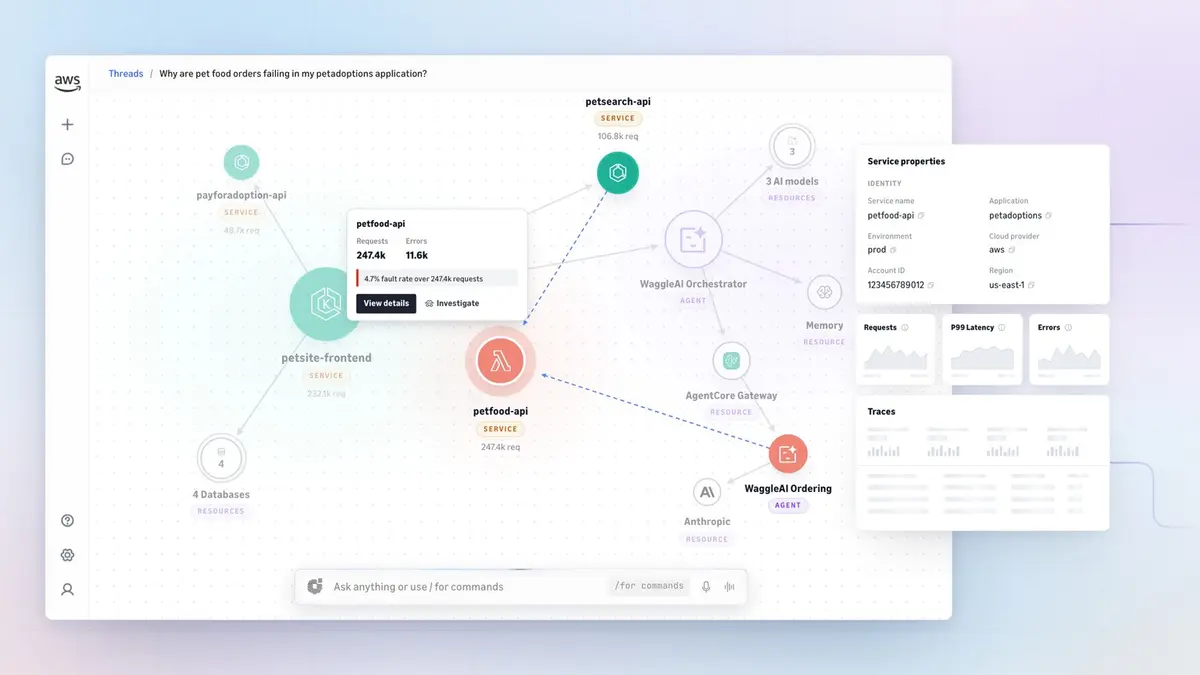
Amazon Web Services has made CloudWatch Omni generally available, an AI-first observability experience built around the teams and the applications and agents they run rather than around a wall of separate dashboards.
What CloudWatch Omni actually does
AWS describes Omni as an evolution of CloudWatch rather than a replacement, and the details support that. It keeps OpenTelemetry interoperability and the scale and reliability of the existing service, then adds a layer on top. Teams create spaces in a central account, and those spaces read telemetry from several AWS accounts and Regions at once, along with workloads running on other clouds including Azure.
The system discovers services on its own, maps the dependencies between them and surfaces golden metrics, so an engineer starts from a picture of the estate instead of a blank query. The interface is mainly conversational: you ask a question in natural language, Omni finds the relevant telemetry, builds dynamic views of the signals that matter and leans on AWS DevOps Agent to help get to a root cause. Anyone who would rather drive manually can click through the same signals, traces and evaluations in the console.
Agents get their own view
The more telling addition is a dedicated agent-observability experience with an evaluation-driven development workflow for AI workloads. It supports LangGraph, CrewAI, OpenAI Agents SDK, Vercel AI SDK and Strands, and it evaluates every prompt, model call and tool invocation so quality can be measured and experiments run before a change ships.
How to get it, and where
You create an Omni space from the CloudWatch console, configure single sign-on and sign in to the standalone web experience. Agent developers can install a free CloudWatch Omni extension for VS Code, Cursor and Kiro to instrument, debug and evaluate agents locally without an AWS account, which is a deliberately low-friction way into the platform.
CloudWatch Omni is generally available in US East (N. Virginia), US West (Oregon) and Europe (Ireland). The pricing is not published in the announcement itself, and AWS directs readers to the CloudWatch Omni pricing page, so treat any figure you see quoted elsewhere with caution until it appears there.
Our opinion
The interesting thing here is not the chat box. Observability tools have been bolting assistants onto dashboards for two years, and most of them answer questions you could already have answered with a saved query. What AWS has actually done is reorganise the console around agents at the exact moment its customers started running non-deterministic workloads in production, where the failure mode is not a crashed pod but a plausible wrong answer. Evaluating each model call and tool invocation is the only way to catch that, and it is the part of this launch that is hard to copy badly.
The caveat is the usual one for a platform play. OpenTelemetry support means the telemetry itself stays portable, but the value AWS is selling sits in the mapping, the evaluations and the questions it has learned to answer, and none of that travels with your data if you leave. A free extension that runs locally without an AWS account is a smart way to get agent developers into the habit early. Whether the habit survives the first real bill is another matter entirely, and on current evidence you will find that out the same way as everyone else: when the invoice arrives.