Android 17's Continue On carries apps between devices
Google has documented Continue On, the Android 17 feature that lets a phone hand a running app over to a tablet so you can pick up exactly where you left off.
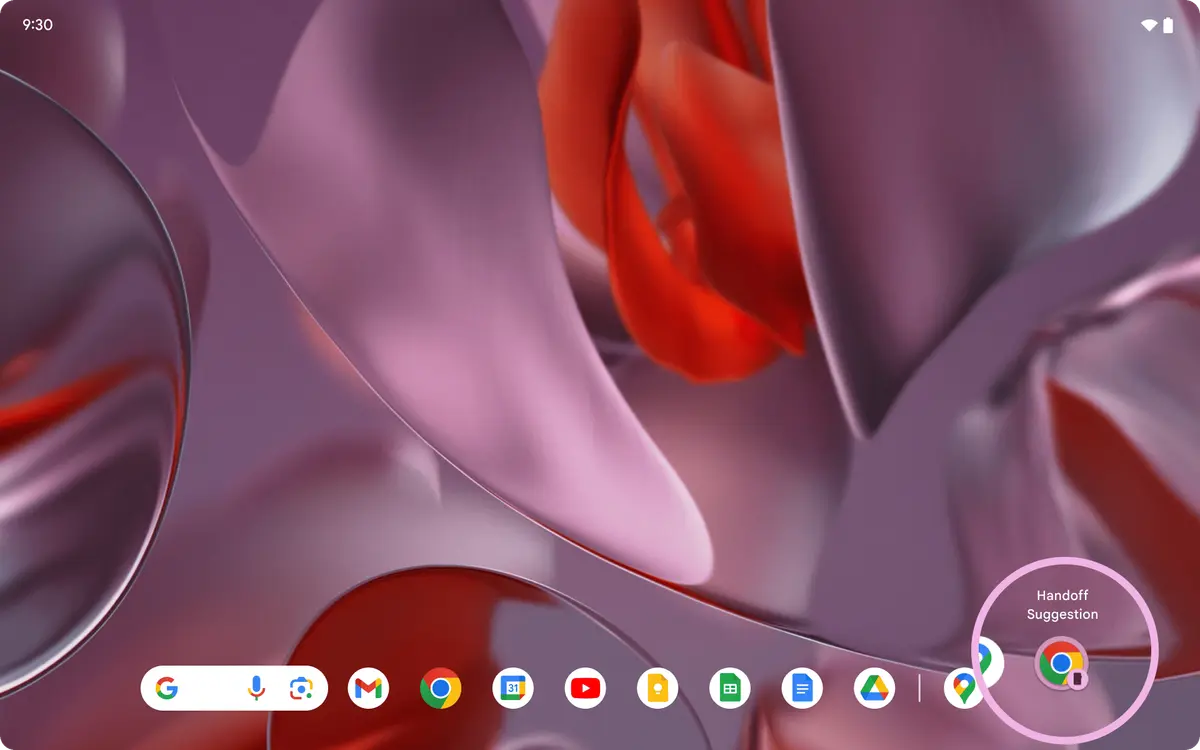
Google has quietly published the documentation for Continue On, a new Android 17 feature that lets you start something on one device and finish it on another. Instead of emailing yourself a half-written draft, you tap a suggestion in the tablet taskbar and the app you were using on your phone opens where you left it.
What does Continue On actually do?
Continue On is cross-device continuity for Android. Google's developer documentation describes two devices: a sender, where an activity starts, and a receiver, which asks for that app and takes the handoff. The handoff itself is the transition of the app plus the data it needs to resume, and it works in both directions, so any supported device can send or receive.
At launch, Google is starting with phone-to-tablet transitions. On the tablet, the taskbar shows a suggestion for the most recently opened app from the paired phone, which gives you a one-tap way to jump straight back into whatever you were doing. Google's own examples include a Google Docs document handing off into the same open tab on a tablet, and Gmail moving from the phone app to the Gmail web experience with the same email thread open.
Do apps have to support it?
Yes, and it is off by default. Developers have to opt an activity in by calling setHandoffEnabled(), which tells the system the screen is ready to be handed off, and then implement onHandoffActivityDataRequested() to return the data the receiving device needs. Google is also letting apps choose how the handoff lands: the same native app deep-linked to the right screen, a web version of the app, a web fallback when the app is not installed on the tablet, or a straight web handoff when the browser really is the better destination.
For now the feature is easiest to see on Google's own hardware. The test setup in Google's documentation asks for two Pixel devices, one phone and one tablet, both enrolled in the Android Beta programme and signed into the same Google account, along with the Cross-Device Services and Google system services public betas. From there you enable Cross-device services in Settings, switch on Tasks and use desktop windowing mode on the tablet to watch the suggestion appear.
Our opinion
Continue On is the least glamorous feature in Android 17 and quite possibly the most useful. Handoff is not new as an idea, but every previous attempt demanded that you switch ecosystems, buy matching hardware or trust a third-party app with your documents. Doing it at the operating system level, with the app's own state and the developer in control of where the user lands, is the version that might actually stick. The catch is the opt-in model: unless apps bother to implement it, you will get a taskbar suggestion for Chrome and very little else, and passive-aggressive emailing of drafts to yourself will survive another Android release.
- Continue On is a cross-device continuity feature available in Android 17 (API level 37)
- A phone can hand a running app to a tablet, which resumes the same activity and data
- The feature works bidirectionally, but launch support is phone-to-tablet transitions first
- On the receiving tablet the taskbar suggests the most recently opened app from the phone
- Handoff is off by default and must be enabled per activity by the developer
- Apps can offer app-to-app, app-to-web, web fallback or direct web handoff flows
- Google's testing setup asks for two Pixel devices, the Android Beta programme and the Cross-Device Services public beta